Aquiva blog/AI Strategy
Process Driven Approach: Definition, Benefits & Implementation
Learn how a process-driven approach improves productivity for Salesforce. How to visualize workflows, align goals & increase efficiency.

When organizations struggle with inefficiencies, it’s rarely because of a lack of technology; it’s usually because the underlying processes aren’t clearly defined. Teams often spend hours firefighting miscommunication, bottlenecks, and rework, all of which slow down delivery and frustrate stakeholders.
According to research, companies lose 20-30% of their annual revenues from these inefficiencies.
Aligning business requirements with architectural solutions is crucial for achieving operational efficiency and success. This can be achieved by implementing the idea of Process Driven Architecture (PDA).
It is a methodology that emphasizes the visualization and validation of business requirements through the use of process mapping. It serves as a bridge between business requirements and architecture, aiming to create adaptable and scalable solutions.
At Aquiva Labs, we help organizations create a process map that is a good fit for the Salesforce implementation projects.
A process-driven approach puts structured workflows at the center of delivery. Instead of racing to configure fields, flows, and integrations, we clarify how value is created step by step and who does what, when, and why.
That discipline builds repeatability, accountability, and the ability to measure outcomes so improvements aren’t accidental, they’re designed.
A process map is a visual representation of a workflow that shows the sequence of steps, decisions, inputs, and outcomes involved in completing a task or achieving a goal. It uses standardized symbols and notations to illustrate how work flows across people, systems, and teams.
A process map highlights inefficiencies, redundancies, and opportunities for improvement that text-based documentation often overlooks.
It includes:
- Work processes
- Relationship among steps
- Roles and Responsibilities in each of the process steps.
Most common process mapping methods include BPMN (Business Process Management Notation), Flowchart, Value Stream Map, UML (Unified Modeling Language), SIPOC (Supplier-Input-Process-Output-Customer), UPN (Universal Process Notation).
Recently, Salesforce has been promoting UPN as the potential notation to standardize process mapping. The big advantages of this process mapping notation are its simplicity and a good match for most of the Salesforce implementation projects.
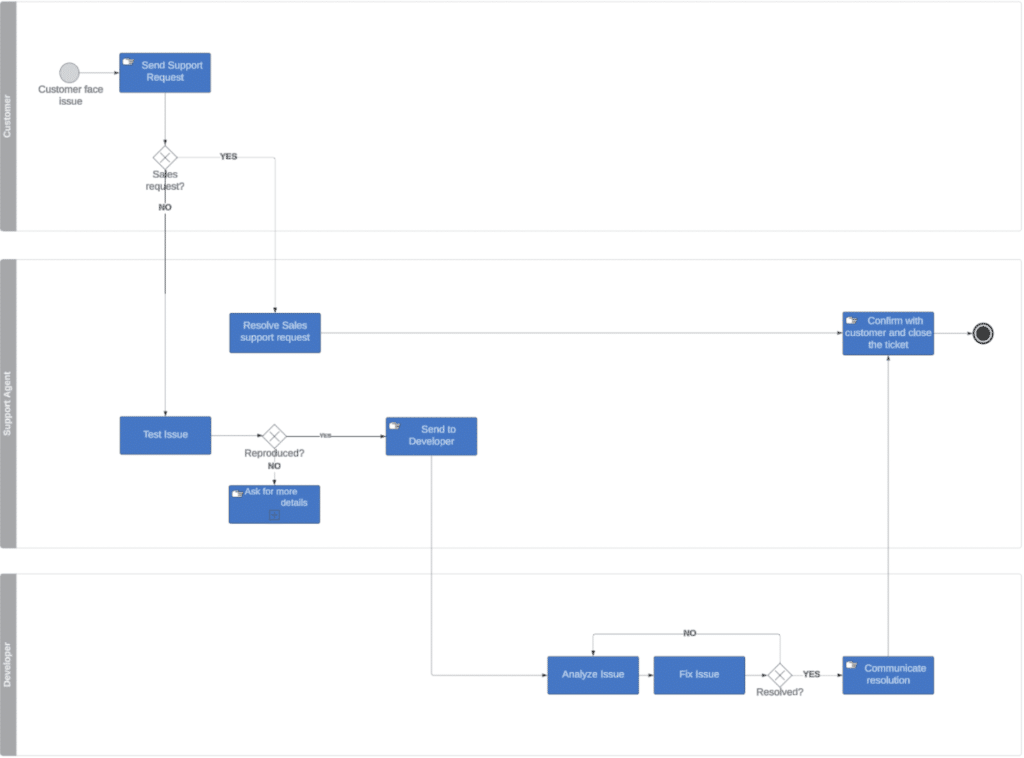
We have marked process actors (Customer, Support Agent, and Developer), actions they are performing, and intersections between different departments (support, engineering, customer success). Thanks to this visualization we can ask the right questions, identify real needs, and deliver a fitting solution.
Our main objective is to be a trusted advisor for our customers. To do so, we need to understand not only technology but also the business processes. Process mapping helps us to understand our customers’ businesses, industries, pain points, opportunities, and trends. It helps us to see key patterns quicker, react faster, and boost time to market.
That future-state map becomes the backbone for solution design: we trace each step to the data it needs, the user or system that acts, and the expected result. This is how we select the right platform features, define org boundaries, and choose the simplest architectural pattern that will scale.
To keep designs healthy, we align each process decision to the Salesforce well-architected principles: Trusted, Easy, Adaptable. We also lean on Salesforce’s decision guides and diagram standards to translate maps into consistent solution artifacts that admins, developers, and stakeholders can read the same way.
Here’s why process mapping is essential for the salesforce professionals:
Improved Communication
Visual workflows make complex processes understandable for everyone, from sales ops to compliance. That shared understanding shrinks the gap between “requirements” and actual work. When we map first, design discussions are faster, and acceptance criteria write themselves because they mirror the diagram.
Enhanced Problem-Solving
Every organization faces recurring inefficiencies, whether it’s duplicate data entry, approvals that stall progress, or manual steps that don’t keep pace with growth. A process map shines light on these weak points by making the entire workflow visible from start to finish.
Once mapped, patterns emerge: bottlenecks become obvious, handoffs are easier to evaluate, and unnecessary steps stand out clearly. For Salesforce professionals, this visibility is invaluable. It pinpoints exactly where automation with Flow, streamlined approvals, or system integrations can deliver the most impact.
Better Decision Making
Leaders often need to make trade-offs: should we automate a task inside Salesforce, or manage it in a connected system? Should we prioritize speed or flexibility for future change?
A process map helps answer those questions by showing the full context of who’s involved, what data is required, and where value is created. With this view, decisions are less about guesswork and more about evidence, giving stakeholders confidence that they’re choosing improvements that truly matter.
Efficiency Gains
Ultimately, process mapping drives efficiency. When workflows are streamlined before a Salesforce build begins, the implementation is faster, cleaner, and easier to maintain.
According to Forrester, business process mapping projects typically deliver a 15–30% productivity gain for knowledge workers.
Teams avoid re-creating broken processes in a shiny new platform, and instead deliver a system that reduces redundancy and accelerates delivery. For organizations, the payoff is quicker time to value, smoother adoption, and a Salesforce environment designed to scale with growth rather than slow it down.
Getting started with process mapping isn’t about creating a perfect diagram on day one. Many professionals struggle with creating and implementing it for Salesforce.
Here’s how to approach it effectively.
Find the Most Suitable Method to Create Your Process Map
We help you choose the right process mapping method, whether it’s UPN for high-level discussions or BPMN for technical precision. Universal Process Notation (UPN) is ideal when you need clarity for non-technical stakeholders such as executives, project sponsors, or end users, because its simple language is intuitive and easy to follow.
Business Process Model and Notation (BPMN), on the other hand, provides rigor and precision that are helpful for technical teams who need to understand exceptions, dependencies, or integration points.
Use Sub-Processes to Keep the Main Flow Easy to Navigate
One of the biggest risks in mapping is overwhelming the audience with too much detail. Breaking a complex process into sub-processes such as “Qualify Lead,” “Validate Opportunity Data,” or “Fulfill Order” keeps the main flow clean and digestible.
Each sub-process can then be expanded when deeper analysis is needed. This not only makes discussions more productive but also mirrors how Salesforce solutions are often built.
Choose a Process Mapping Method with Outcomes in Mind
Not every process requires the same depth of documentation. A high-level flowchart might be sufficient for a simple approval sequence, while a swimlane diagram or BPMN model could be more appropriate for cross-functional processes involving multiple teams or systems.
Increasingly, organizations are combining process mapping with process mining tools that analyze real user behavior in Salesforce and connected systems. This combination ensures you’re not only documenting how processes should work, but also uncovering how they actually work in practice.
Create the Map with Structure and Logic
Start by capturing each step, decision, and outcome in sequence. Don’t just document tasks,tie them to business rules, data inputs, and expected results. This exercise often surfaces “shadow processes,” such as manual data exports or offline spreadsheets, that slow down work and create risk.
Validate the Map with Stakeholders
A process map is only valuable if it reflects reality and supports business goals. Bring together business stakeholders, end users, and Salesforce professionals to validate the map. Encourage discussion about pain points, exceptions, and priorities for improvement.
As you define the future-state map, evaluate it against Salesforce’s Well-Architected Framework principles:
- Trusted: Does the process protect data integrity and security?
- Easy: Can users follow the process without excessive steps or friction?
- Adaptable: Will the process remain relevant as business needs evolve?
Before you start creating a process map, you must be aware of some mistakes that might complicate the process. Here are some pitfalls to look for:
Overcomplicating the Map
One of the most frequent mistakes in process mapping is trying to capture every possible branch, exception, and edge case in a single diagram. While the intent is usually thoroughness, the result is a cluttered, overwhelming map that few people can actually use.
In Salesforce projects, this often translates into overly complex automation or configurations that are hard to maintain.
Neglecting Stakeholder Input
A process map that doesn’t reflect the reality of day-to-day operations is little more than a pretty picture. This happens when the mapping exercise is done by a small group without involving the people who actually execute the work.
In Salesforce terms, this can mean designing automation that looks efficient on paper but creates frustration for sales reps, service agents, or compliance teams. To avoid this, it’s essential to include frontline users and stakeholders from multiple functions in the mapping process.
Failing to Update
A process map is not a one-time deliverable; it’s a living document. Yet many organizations create a map at the start of a project and never revisit it. The danger here is that as business needs change, Salesforce evolves, or new integrations are added, the map quickly becomes outdated.
Teams may end up working with a process that no longer matches reality, leading to inefficiencies and misalignment. The solution is to build a cadence for updates. Pair process maps with monitoring tools such as dashboards, metrics, or even process-mining snapshots that reveal how workflows are performing in practice.
Process mapping isn’t just about drawing diagrams, it’s about creating clarity, building alignment, and designing Salesforce implementations that stand the test of time. A process-driven approach ensures workflows are efficient, scalable, and directly tied to business outcomes.
At Aquiva Labs, we bring this discipline to every engagement, combining proven mapping practices with deep Salesforce expertise. Our role goes beyond implementation: we act as a trusted advisor, design future-ready architectures, and deliver solutions that adapt and grow with their business.