Aquiva blog/Salesforce Platform
Bring Your Own Channel for CCaaS: how the pieces fit together
BYOC for CCaaS brings an external contact center platform into the Salesforce agent console. Salesforce documents each API, but not how they fit together. Here is what we learned building one.

An agent answers a WhatsApp conversation in an external contact center console. The customer's message is on one screen and the customer's record is on another, in Salesforce, so the agent copies the order number across by hand. When the conversation ends, the transcript stays in the contact center platform and the case stays in Salesforce. Most organizations we have worked with put up with this, because the obvious fix has always been to migrate the channel, and nobody wants to migrate the channel.
Bring Your Own Channel for CCaaS, or BYOC, is Salesforce's answer. CCaaS stands for contact center as a service: a cloud platform that handles a company's customer conversations across messaging and voice. With BYOC, that platform delivers its conversations into the standard Salesforce agent console. The channel stays where it is, and the agent stops switching windows.
BYOC is a set of APIs, so it does nothing until someone builds the connection between the two platforms. Salesforce documents each API well: the Interaction Service API, the Pub/Sub API, and the Service Connector API for voice. What the documentation does not show is how they fit together into one working contact center.
We built one of these connections, and this article is what we wish we had known at the start. Along the way we say whether we are describing standard Salesforce behavior or a choice we made ourselves.
What Salesforce provides, and what we built
Salesforce provides the APIs, the agent console, Omni-Channel (which hands work to agents), and the objects that store conversations. Everything that connects those to a specific contact center platform has to be built.
Our build is a package that installs into a Salesforce org. It contains:
- The channel setup. Every messaging channel the CCaaS platform handles arrives in Omni-Channel as a single channel, so the agent works every conversation from the same console.
- The Apex, the Lightning Web Components, and the platform event that carries agent replies back out.
- An Agentforce agent that takes the first contact on all of those channels.
- A custom component for assisted replies, covered below.
- The voice connection, through Salesforce Voice with Partner Telephony. Voice uses its own APIs and has its own section below.
Supervisors use Salesforce's Command Center for Service, where they monitor every queue, Agentforce agents included, from one app.
Salesforce offers BYOC in two variants. We used BYOC for CCaaS, which is made for an external contact center platform that brings its own channels. The other variant, BYOC for Messaging, is not covered here.
Two terms come up throughout. The CCaaS platform is the external contact center system. Its connector is the software on that side that talks to Salesforce.
Messages come in through one API and go out through another
Standard Salesforce behavior.
Inbound and outbound messages travel differently, and it helps to know both paths from the start. Inbound, when a customer writes, the connector builds an Interaction Service payload and posts it to the interactions endpoint. Salesforce creates the messaging session and the messaging end user record, and Omni-Channel routes the work to an agent. Outbound, when the agent types a reply, Salesforce publishes it to the custom platform event configured for the channel. The connector subscribes to that event through the Pub/Sub API and either handles the message itself or forwards it to the external channel.
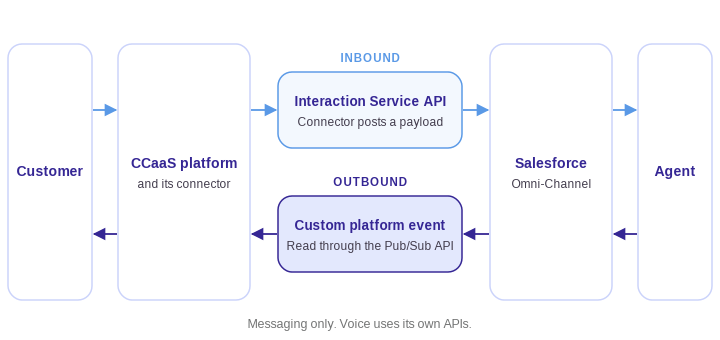
That platform event is for messaging; voice does not use it by default. It carries more than message text. Typing and read indicators travel on it too, so the connector has to handle those as well. You choose the event's name and nothing in Salesforce depends on it, so pick one the connector can live with and then leave it alone.
Because Salesforce pushes replies out as events, the connector never has to poll Salesforce for new messages. The traffic still counts against limits: Pub/Sub and platform event delivery each have their own allocations, and those are the numbers to watch as volume grows. We are not publishing how many messages our own build handles, because the figure would not apply to yours. It depends on the CCaaS platform in front of the channel and on the limits of the org behind it.
Standard Omni-Channel reached end of life with the Summer '26 release, and Salesforce moved orgs to Enhanced Omni-Channel automatically during the rollout. If your BYOC plan was written for Standard Omni-Channel, review it.
To read a transcript back out of Salesforce, we used the Connect REST API. Its conversation entries resource returns the transcript of one conversation, whether the CCaaS platform, a Flow or a Lightning Web Component is asking. Salesforce designed it for single conversations and small batches. It is not a bulk export tool, and it has its own hourly rate limit. Salesforce also has a newer Conversation Data API for the same job; both are described in Access Conversation Data.
Three IDs do three different jobs
Our design decisions.
We learned why this matters in our own build, when a retry from the CCaaS platform showed an agent the same customer message twice.
The external conversation ID links the two sides: the conversation in the CCaaS platform and the session in Salesforce. It cannot be used to spot duplicates, because one conversation contains many real messages and they all share that ID.
A stable ID per message is what spots duplicates. The external message ID, or the ID on the interactions payload, tells you that the message arriving now is one you already stored. Without it, every retry becomes a second copy on the agent's screen, and the agent cannot tell which one is real.
The request UUID is for troubleshooting. It follows one API call through the logs. Do not use it as a business key.
Decide at the same time what happens when a call fails with a server error (a 5xx): retry, escalate, or show the failure to the agent. A team that does not decide has chosen to retry. We retry, and when the retries run out, the agent sees the failure in the console.
Agree on the fields of the outbound event before writing Apex. Platform events have no schema migration, so changing the event later means changing every subscriber at the same time.
A MessagingSession is not the whole conversation
Standard Salesforce behavior.
The messaging data model has more layers than most teams expect. A Conversation can hold one or more messaging sessions or calls, so a MessagingSession is one session and not the customer's whole history.
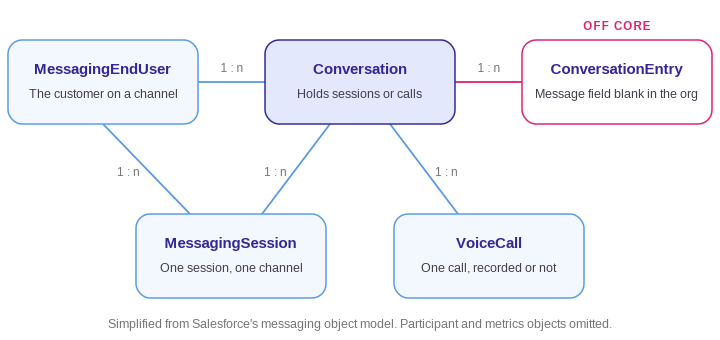
One MessagingEndUser can have several MessagingSession records and one or more Conversation records, and each Conversation holds one or more ConversationEntry records. The full diagram, with participant and metrics objects, is in Salesforce's messaging object model documentation.
BYOC runs on enhanced channels, and for those Salesforce stores the entries off core, in a separate store. A ConversationEntry record appears in the org once the session ends, but its Message field is blank. To get the text, you use the APIs described above.
For reporting, that off-core data can be synced to Data 360. There you can report on it and export it in bulk, which the conversation entries resource is not built for.
Voice is its own project
Standard Salesforce behavior.
Voice works in a similar way, through different APIs. With Salesforce Voice with Partner Telephony (formerly Service Cloud Voice with Partner Telephony), the telephony platform runs the call, Salesforce creates and updates the VoiceCall record, and the softphone sits inside Omni-Channel. The call controls are wired through the Service Connector API.
The Service Connector API is a JavaScript library that you extend to handle voice events. It runs inside the Omni-Channel phone widget, listens for events and forwards them where they need to go. It has methods for the supported operations, such as transfer, hang up and add a supervisor.
The setup differs from messaging in the ConversationVendorInfo metadata, which defines the vendor type, the telephony provider's URLs and the features it supports. Voice also needs its own channel, and the data model changes a little. Calls are stored in VoiceCall and, when recording is on, in VoiceCallRecording. The transcript uses the same Conversation and ConversationEntry objects as messaging.
Assisted replies: a custom component on the standard prompt template
Assisted replies are reply suggestions that an LLM drafts for the agent from the conversation. Service Cloud offers two ways to get them. The standard way is the Assisted Replies component, which is tied to the Enhanced Conversation component. One of our clients had built their own conversation component and did not want the standard one, so we took the other way: a custom Lightning Web Component that calls the same prompt template in the background. The standard component runs on an editable prompt template, and ours calls that template directly. The agent gets a very similar experience, and the LLM side is identical.
This route works with any license that includes prompt templates. The list below is current as of November 2026. The Agentforce names come from Salesforce's packaging update of June 17, 2025, which replaced the Einstein add-ons and Einstein 1 Editions.
- Agentforce 1 Editions (Sales, Service, Field Service and the rest), formerly Einstein 1 Editions. Prompt Builder, Data 360 and credits are included, and older contracts signed under the Einstein 1 name carry the same entitlement.
- Per-user Agentforce add-ons: Agentforce for Sales, Service or Platform, formerly Einstein for Sales, Service or Platform. This is the most common route on an org that already runs Enterprise or Unlimited.
- Agentforce with Flex Credits, licensed at org level, where every prompt template invocation draws credits.
- Einstein Copilot and Einstein GPT add-ons from the 2023 and 2024 contracts, which Salesforce has since migrated to the Agentforce names.
- Developer Edition with Agentforce and Data 360, the free developer edition, for building and testing only.
In our build, an agent must review every suggested reply before it is sent. The platform does not require this. We chose it, and we would choose it again.
None of this needs a custom model, fine-tuning or an ML pipeline. The work is in what the template reads: a transcript it can access, a record relationship it can follow, and Knowledge articles that someone keeps current. Knowledge is the one that slips. A suggestion based on an article that went stale a year ago is worse than no suggestion, because it still sounds confident, and an agent who accepts a wrong one stops trusting the panel.
What our package carried, and what each org still needed
Our packaging experience.
It is tempting to sort everything into "goes in the package" and "done by hand". In practice there are three groups, and the boundaries between them have shifted as the platform has changed.
Most of the build ships in the package. That covers the Apex classes and triggers with their tests, the Lightning Web Components and the console app, custom objects and fields, the channel definition and vendor information records, the custom platform event that carries outbound traffic, and the prompt template behind the assisted replies component. For voice, the Conversation Channel Definition is not needed and the vendor information is different.
Some setup has to be done after every install. Activation, user assignment, the actual channels, and the queues and routing all depend on the org, so no package can carry them.
The rest depends on how you distribute the app. OAuth works differently for an app that a partner distributes and for one that the customer configures. A partner-distributed app has to use External Client Apps, with JWT or the web server OAuth flow. Both the External Client App and the prompt template (GenAiPromptTemplate) can go into a second-generation managed package (2GP), which settled the question for us.
Write up everything in the second and third groups as a setup guide, and treat that guide as a deliverable.
Decisions to make before the first line of Apex
- Which channels go through BYOC and which stay where they are. Not every channel needs a Salesforce session.
- Which system guarantees a stable ID per message. If the CCaaS platform cannot promise one, you have to build it.
- What happens when an outbound message fails, and who sees the failure.
- Who decides routing: Salesforce, or the CCaaS platform (Salesforce calls this partner-owned routing). The events you must handle depend on the answer. Ours was partner-owned.
- Where reporting will come from. Settle this before anyone promises a unified report.
- Who owns Knowledge. Assisted replies are only as good as the articles behind them, and the owner of those articles is rarely on the integration team.
This article accompanies our talk at Mexico Dreamin' in Mexico City on Friday, 20 November 2026.
Where Aquiva fits in
We build and ship Salesforce integrations like this one, including the packaging and the security review when the result will be distributed and not used in just one org. If you are evaluating BYOC for a CCaaS platform, or adding a channel that Salesforce does not support natively, talk to us before you commit to an architecture.