Aquiva blog/Salesforce Releases
Salesforce Storage Costs in 2026: Allocations, Overages, and the Cheaper Ways Out
Salesforce data storage costs about $125/month per 500 MB, roughly $3,000 per GB per year; file storage runs about $5/GB/month. Full allocations by edition, what happens when you exceed the limit, and how to cut storage costs without buying more.
Salesforce storage costs are metered twice, and the two meters bill very differently. Data storage holds records: accounts, opportunities, cases, custom objects, tasks. File storage holds binaries: attachments, Salesforce Files, documents, Chatter uploads. A third category, Big Object storage, sits alongside both and is the one most orgs forget they already own.
The short version, for anyone who came here for the number: additional data storage runs about $125 per month per 500 MB, roughly $3,000 per gigabyte per year, while file storage runs about $5 per gigabyte per month. Most editions start from 10 GB of each per org, plus a per-user increment on both. Your exact allocation is in Setup under Storage Usage, and it is worth looking before you read further, because everything below is about what happens when those numbers run out.
Salesforce storage allocations by edition
Both meters work the same way: a base allocation per org, plus an increment per user license. Salesforce publishes the data storage allocations and the file storage allocations on separate pages, which is why the file-side per-user figure is so often missed.
| Edition | Data per org | Data per user | File per org | File per user |
|---|---|---|---|---|
| Contact Manager | 10 GB | 20 MB | 10 GB | 612 MB |
| Group | 10 GB | 20 MB | 10 GB | 612 MB |
| Professional | 10 GB | 20 MB | 10 GB | 612 MB |
| Enterprise | 10 GB | 20 MB | 10 GB | 2 GB |
| Performance | 10 GB | 120 MB | 10 GB | 2 GB |
| Unlimited | 10 GB | 120 MB | 10 GB | 2 GB |
| Essentials | 10 GB | not allocated | 1 GB | not allocated |
| Starter | 10 GB | not allocated | 1 GB | not allocated |
| Developer | 5 MB | not allocated | 20 MB | not allocated |
| Personal | 20 MB | not allocated | 20 MB | not allocated |
Two qualifications on the file side. The per-user allocation counts standard licensed users only, so a large platform- or community-license population adds far less headroom than headcount suggests, and Contact Manager, Group, and Professional orgs under ten people get 1 GB per user rather than 612 MB. Custom licenses carry whatever your contract says, so the only authoritative number is on your own Storage Usage page.
Work an example through and the asymmetry shows up. A 50-user Enterprise org has 11 GB of data storage and 110 GB of file storage: ten times the room on the meter that costs a fraction as much per gigabyte. Records, not documents, are what you will end up moving off the platform. One more data-side trap while you are reading the table: on Performance and Unlimited, Lightning Platform Starter licenses receive 20 MB rather than 120 MB, which matters more than it sounds in orgs with a large platform-license population.
On the data side the unit is the record, not the field: a two-field record and a two-hundred-field record cost the same, which is why trimming fields is not a storage strategy. Most records run about 2 KB, so a gigabyte is roughly 500,000 of them. Salesforce publishes the estimates by object, and the exceptions are what hurt:
| Record type | Estimated size |
|---|---|
| Most standard and custom object records | 2 KB |
| Person accounts | 4 KB (one account plus one contact) |
| Knowledge articles | 4 KB, varying with rich text |
| Campaigns | 8 KB |
| Campaign members | 1 KB |
| Email messages | 2 KB nominal, but see below |
Email messages are listed at 2 KB, and that number is close to meaningless in practice. Storage varies with the message, and Salesforce's own example is a 100 KB HTML email consuming 100 KB of data storage. Plain-text messages cost less because they carry no markup or text-version duplicate. So an org running Email-to-Case on HTML mail can be metering inbound at fifty times what a record count suggests, which is why Service Cloud orgs blow through allocations that looked comfortable on paper. Two smaller ones: person accounts at 4 KB means 500,000 of them take about 1.9 GB, and images embedded in rich text bill to file storage rather than data, which explains most cases of file usage climbing when nobody uploaded anything.
What extra Salesforce storage costs
Salesforce does not publish list pricing for additional storage. The figures customers report in 2026 put additional data storage at roughly $125 per month for 500 MB, and file storage at roughly $5 per GB per month. Your contract may differ, and negotiated rates vary widely, so treat these as the shape of the problem rather than a quote.
Run the data figure out: one extra gigabyte of record storage costs about $3,000 a year. The same gigabyte in an object store costs a few dollars, and 5 GB on S3 runs under $30 a year. File storage overage is far gentler per gigabyte, which is why the expensive surprises are almost always on the data side, even though file storage is usually the meter that fills first.
When an org with 10 GB starts paying overages, it usually is not because the sales team created too many opportunities. It is because something automated is writing records nobody reads.
What happens when you exceed a Salesforce storage limit
This is the part most storage explainers skip, and the answer differs by environment.
In production, Salesforce does not hard-enforce the limit, because blocking writes on a production CRM would be worse than the overage. You will see STORAGE_LIMIT_EXCEEDED warnings and the org keeps working. What you have entered is a contractual overage, not a technical failure, and Salesforce Support cannot raise a production limit for you: that conversation goes through your account team. Push far enough past the allocation and the practical symptoms arrive anyway, as report and query latency, errors surfacing in workflows, and API-driven integrations failing in ways that look like anything except a storage problem.
In sandboxes, the limits are enforced strictly. Exceed either meter and record saves or file uploads block immediately. Because the two meters are calculated separately, headroom on one does not rescue you on the other, and a full-copy sandbox that mirrors a production org near its ceiling will hit the wall before production does.
Two operational notes. Storage is calculated asynchronously, so the Storage Usage page lags after a large import or delete and you cannot judge a cleanup by refreshing it. And there is no native, configurable threshold alert: Salesforce commits to reasonable efforts to notify you as you approach the maximum, which is a contractual courtesy, not a control. If you want alerting you build it, with a scheduled job writing both meters to a custom object so you have a trend rather than a single reading.
Where Salesforce data storage actually goes
Open Storage Usage and sort by record count. Viewing it requires the Manage Internal Users and Manage Users permissions, which is its own small obstacle in orgs where the person chasing the storage bill is not a full admin.
In most orgs past their allocation, the top of that list is a predictable set of offenders. Email messages are the quiet giant in any org running Email-to-Case, since every inbound and outbound message is a record on the data meter and, as above, is billed at its real size rather than a flat 2 KB. Flow Interviews accumulate wherever screen flows and paused flows run at volume, which is the thesis of this post in a single object. The Action Cadence family that ships with Sales Engagement is eight separate objects, all of them on the data meter, all of them growing with activity rather than with headcount. Then the familiar tail: integration and error logs from middleware, marketing-automation activity, field-history rows, and archived cases nobody has looked at since the migration before last.
Old notes have their own wrinkle. Notes count against data storage, not file storage, so a decade-old org can carry gigabytes of 2 KB flotsam that never appears on the file meter you have been watching.
Three counting rules are worth knowing before you build a remediation plan, because each one has surprised somebody:
- Person accounts count twice. Each one is an account plus a contact, and both count.
- Archived activities still count. Archiving an activity in Salesforce does not remove it from the meter.
- Products, price books, price book entries, and assets do not count at all, which rules out an entire category of guess.
Where Salesforce file storage actually goes
File storage gets treated as the cheap meter and then quietly becomes the urgent one, because 10 GB per org does not stretch far in a document-heavy Service Cloud or Field Service deployment. It covers attachments, Files home, Salesforce CRM Content, Chatter files including user photos, the Documents tab, the custom File field on Knowledge articles, and Site.com assets.
Diagnosing it is harder than diagnosing data storage, for a specific reason. Open Storage Usage and the largest line under Current File Storage Usage is almost always Content Bodies, and ContentBody cannot be queried, inserted, updated, or deleted directly. It is internal. You reduce it by deleting the records that own it, which means ContentDocument and ContentVersion.
That leads to the second trap. The obvious move is to size the problem with SOQL:
SELECT SUM(BodyLength) FROM Document
SELECT SUM(BodyLength) FROM Attachment
SELECT SUM(ContentSize) FROM ContentVersion
SELECT SUM(ContentSize) FROM ContentDocument
Those totals will come back lower than the Storage Usage page, and the discrepancy is not a bug. The querying user cannot see files in libraries they are not a member of, or in unlisted groups. The fix is the Query All Files permission, which itself requires View All Data and View All Records. Without it you will build a cleanup plan against a systematically undercounted picture, and the plan will underdeliver by exactly the amount you could not see.
The third trap is versions. Salesforce Files are three objects, not one: ContentDocument is the file, ContentVersion holds the binary, and ContentDocumentLink is the junction to every record, user, group, and library it is shared with. There is one ContentVersion per version, past and present, and every one of them holds its own copy of the binary. An org where users re-upload a revised contract rather than replacing it is paying for every draft. Pruning superseded versions is often the single highest-yield file cleanup available, and almost nobody does it, because the storage cost of a version is invisible from the record page.
One last reading error: the Percent column under Current File Storage Usage is a percentage of the storage currently in use, not of the storage available, so a single photo in an otherwise empty org reads as 100%. Upload ceilings also vary by path if you are planning a migration rather than a cleanup, and Salesforce documents the limits across Files, CRM Content, Knowledge, Documents, and Attachments.
Cut storage costs by tiering on access pattern
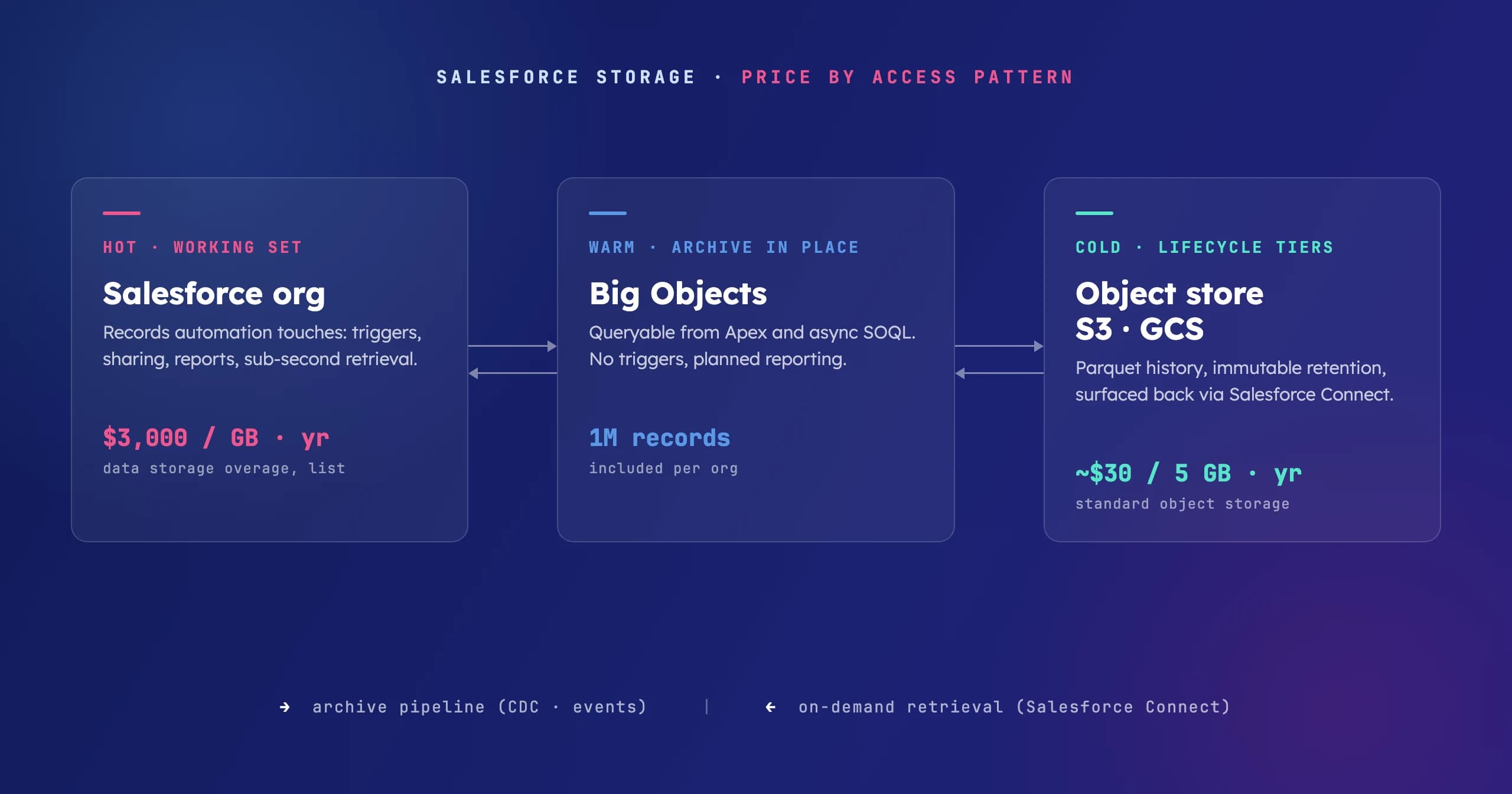
The architectural mistake behind most storage bills is treating the CRM as the only place data can live. Price it by access pattern instead. The working set, the records automation touches and users open daily, belongs in the org. That is what the $3,000 gigabyte-year actually buys: triggers, sharing rules, reports, and sub-second retrieval. Everything else is a question of how fast anyone will ever need it back.
Big Objects hold the warm tier, queryable and on platform. Every eligible edition already includes one million Big Object records per org, off the data storage meter, so closed cases and historical activity stay reachable from Apex and async SOQL. They are also routinely oversold as a general archive: no triggers, no validation rules, no workflow, and queries run only against the index you defined when you created the object, so retrieval paths have to be designed up front and are expensive to change later. The one million is enforced contractually, not merely advertised. Used for what they are, an indexed archive with known retrieval paths, they are the cheapest real win here, because you already own them.
The hyperscalers hold everything colder, at a fraction of the price. The pattern that holds up is an event-driven archive pipeline: Change Data Capture or platform events feed middleware, records arrive in S3 or Google Cloud Storage as Parquet or JSON, and the org deletes only after the landing is verified. Lifecycle policies then walk aging data down the price curve automatically, and a retention schedule compliance will sign sits better on immutable object storage than inside a CRM. When someone needs an archived record, Salesforce Connect and external objects surface it back on demand, at query time, without re-ingesting it.
Industry data platforms carry the firehose. In verticals with high-volume operational telemetry, the raw stream should not reach CRM storage at all. Hospitality is the clean example: Hapi runs its own data lakes for the PMS and POS event stream and delivers curated guest profiles into Salesforce. We built that integration layer with them, and the division of labor is the point: the industry platform owns raw history, Salesforce owns the records people and automation act on.
Where Data 360 fits, and where it doesn't
Data 360 (formerly Data Cloud) keeps getting proposed as the storage fix, and architects should treat that idea carefully. It is a unification and activation platform: it aggregates sources, resolves identity, and activates unified profiles and insights. Three properties matter for this decision, and the first one surprises people in both directions.
First, and this is the part worth knowing before anyone quotes you a price: if you are on Enterprise Edition or above, you can provision Data 360 at no cost through Your Account, and it comes with 1 TB of data storage plus 250,000 Flex Credits a year on Enterprise and Unlimited, or 2,500,000 on Unlimited Plus, prorated across the remaining term of your core contract. Salesforce's own provisioning article still calls them Data Services credits, so expect both names in the wild. Set that 1 TB against the roughly $3,000 per gigabyte per year that core CRM data storage costs and the arithmetic looks extraordinary.
It is not, and the second property is why: the credits are the meter, and they meter what you do with the data rather than the fact of holding it. Ingestion itself is largely free now. Since August 2025, structured data arriving through the CRM, Marketing Cloud Engagement, Marketing Cloud Personalization, and Commerce Cloud connectors carries a zero multiplier, batch and streaming alike, and CRM Analytics datasets are unmetered too.
Read the exclusions, though, because they describe the archive case precisely. The zero-cost policy covers the ingestion phase only: harmonization, identity resolution, transformations, queries, and activations all still draw credits, and exceeding your allocation gets you billed rather than blocked. It covers structured data from internal Salesforce clouds only, so external sources such as the S3 connector and anything unstructured are outside it. Landing your own CRM history in Data 360 is therefore cheap, and doing anything with it is not; bringing cold data in from outside is neither. Data 360 is a poor archive for the same reason a data warehouse is a poor filing cabinet: you pay for motion, not shelf space, and archived data is all shelf.
Third, zero-copy changes the ingest question: where your warehouse is Snowflake or BigQuery, Data 360 can federate against it in place, which means the lakehouse stays the system of record for history and nothing is stored twice. And what Data 360 is genuinely for, unified profiles grounding segmentation, activation, and Agentforce agents, works best when it holds exactly the curated slice those use cases need.
"High level of technical expertise and understanding for complex business cases. The partner showed a great way to guide [us] through the technical landscape and help us find the right direction for our data360 solution to take."
— Verified project review, June 2026, on our AppExchange consulting listing
How to reduce Salesforce storage costs, in order
Delete with intent. The recycle bin holds soft-deleted records for 15 days and they keep counting until purged. For log-type objects, a scheduled hard delete on a retention window, 90 days of integration logs rather than four years, is often the whole fix. Be honest about the ceiling: data accumulates faster than anyone can safely delete it, and in regulated industries the records you most want gone are the ones you must keep. Deletion buys time, not a different growth curve.
Prune file versions and orphaned content. Grant Query All Files, find the superseded ContentVersion records and the ContentDocument records no longer linked to anything live, and remove them. This costs nothing but attention and it is the fastest file-side win in most orgs.
Tier by access pattern, with Big Objects for what must stay queryable from Apex and object storage for everything colder, per the pipeline above. This is integration work, and the same data layer design conversation as the rest of your stack.
Weigh Salesforce's own Archive app. It is a native archiving product with a Storage Analyzer, at additional charge, and it keeps the archive inside the Salesforce estate rather than on storage you own and price. Worth it for teams whose volumes do not justify building a pipeline. Past that, owning the destination wins.
Move files out. If file storage is the problem and cleanup has run its course, external file storage with a connector keeps the file a click away from the record at object-store prices.
Buy storage last. You buy it under Setup → Your Account → Browse & Buy, and paying list price is the right answer only for data that must stay hot: active pipeline, open cases, anything automation touches daily. If the data has not been queried in a year, you are paying CRM prices for a filing cabinet.
Frequently asked questions
How much does extra Salesforce storage cost?
Salesforce does not publish list pricing. The figures customers report in 2026 are roughly $125 per month per 500 MB of data storage, about $3,000 per GB per year, and roughly $5 per GB per month for file storage. Contracts vary.
What's the difference between data and file storage?
Data storage counts records, at roughly 2 KB each. File storage counts binaries: attachments, Files, Documents, Chatter uploads, user photos. They are metered separately, data storage is the expensive one per gigabyte, and file storage usually fills first.
What happens if you exceed your Salesforce storage limit?
In production, nothing blocks. You get STORAGE_LIMIT_EXCEEDED warnings and a contractual overage to resolve with your account team, not with Support. In sandboxes the limit is enforced immediately and blocks record saves and file uploads.
Do Big Objects count against data storage?
No. They are allocated separately, one million records per org on eligible editions, which makes them the cheapest archive tier most orgs already own. The constraints: no triggers, no validation rules, no workflow, and queries only against the index you define when you create the object.
Should we archive Salesforce data to S3 or GCP?
If the data is out of the working set and seconds-to-minutes retrieval is acceptable, yes: object storage with lifecycle policies is orders of magnitude cheaper, and Salesforce Connect surfaces archived records back on demand. Keep the org authoritative for anything automation still touches.
Is Data 360 a way to reduce storage costs?
Not on its own, though the offer looks like it should be. Enterprise Edition and above can provision Data 360 free through Your Account with 1 TB of storage and 250,000 annual Flex Credits, or 2,500,000 on Unlimited Plus. The storage is genuinely free, and since August 2025 so is ingestion of structured data through the CRM, Marketing Cloud, and Commerce Cloud connectors. The credits meter what happens next: harmonization, identity resolution, transformations, queries, and activations, with overages billed rather than blocked. External sources and unstructured data are outside the zero-cost policy. Excellent for the curated slice grounding segmentation, activation, and Agentforce. Poor for cold history you keep only to satisfy a retention schedule.
How do I see what's using our storage?
Setup → Storage Usage shows both meters, record counts per object, top users, and your largest files. It needs the Manage Internal Users and Manage Users permissions. Sort by count; the culprit is usually in the top three rows. For file storage, grant yourself Query All Files first, or your numbers will undercount everything you cannot see.
Storage bills are an architecture symptom, not a procurement problem. If your org is paying CRM prices for cold data, the fix is a tiering design, and that is the same data layer conversation as the rest of your platform. We are happy to have it.